Editable QR code — change the destination without reprinting
Change the destination of a QR code that is already printed, at any time: the image stays the same, and the materials in circulation lead straight to the new page.
Plans: Free · Pro · Entreprise
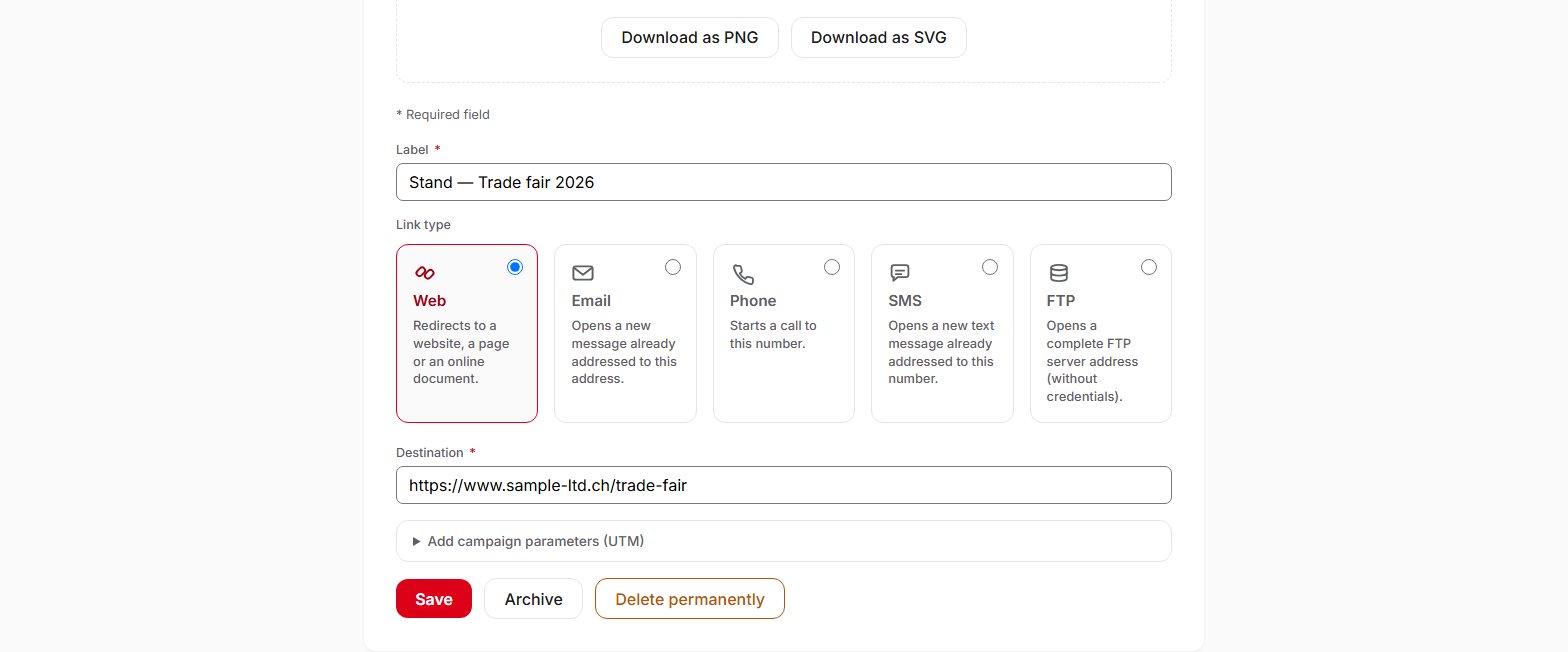
A QR code created with QR Suisse is dynamic: its image does not encode your destination, but a short address that redirects at the moment of the scan. On the QR code's page, you change the destination, then click Save. The change takes effect immediately: materials already printed lead to the new page, without reprinting. In a Link QR code, you can also switch from one link type to another (Web, Email, Phone, SMS, FTP). A Business card or a Calendar can be corrected in the same way, and the correction applies to subsequent scans. When you no longer need a QR code, archive it: its redirect stops, nothing is deleted, and you can reactivate it at any time. These features are available on all plans, including the Free plan. With the Pro and Entreprise plans, you can archive or reactivate up to 100 QR codes at once.
Change the destination, then save: the printed materials follow (demo account).
Frequently asked questions
How can a printed QR code change its destination?
The image encodes a short address that never changes. The destination is stored in your account, and on every scan, QR Suisse redirects to the current destination. If you change it, only the redirect changes: the image stays the same. Exception: if you activate a custom domain, images downloaded afterwards carry your domain's address. Read the help page before printing.
What can I change after creating a QR code?
The label, and depending on the type: for a Link QR code, the destination, the link type (Web, Email, Phone, SMS, FTP), the UTM parameters of a Web link, the subject and message of an email, the message of a text message; for a Business card, the contact details; for a Calendar, the event. In the dashboard, the QR code's type (Link, Business card or Calendar) is set at creation.
Do people who have already saved my contact or my event receive the correction?
No. A business card or an event already added to a phone is not updated. The correction applies to subsequent scans.
Can I schedule a change of destination for a given date?
No. The change applies as soon as you save it. For a change of season or menu, save it at the time you want.
What is the difference between archiving and deleting a QR code?
In both cases, the person scanning gets a not-found page. Archiving keeps everything: the content, the statistics and the option to reactivate the QR code. Permanent deletion erases the QR code and its statistics, and its address can never be used again. If in doubt, archive.
On the Free plan, can I edit my QR codes without limit?
Yes, as often as you need. The Free plan's limit applies to the number of active QR codes: 3 at a time. An archived QR code does not count towards this limit, but it can only be reactivated if you have fewer than 3 active QR codes.
How long does a printed QR code keep working?
As long as your QR Suisse account remains active and the service is available. If a Pro or Entreprise subscription ends and you have more than 3 active QR codes, your 3 oldest QR codes keep working normally. The others remain usable for 14 days, but the person scanning first goes through an intermediate QR Suisse page; after that, they are paused. Read the help page.
Can I change the destination from my own tools, via the API?
Yes, with the Pro and Entreprise plans and an API key that has the “Update QR codes” right: the destination of a Link or Calendar QR code, or the contact details of a business card. Note: via the API, the destination is replaced as sent. A web address sent in place of a Calendar's turns it into a Link. An update does not count towards the monthly quota, which only covers creations.